Pages

Showing posts with label Iphone News/jailbreak. Show all posts

Saturday, 3 September 2011

Redsn0w 0.9.8b7b for Macintosh and Windows to Jailbreak IOS 5 beta7


Redsn0w 0.9.8b7b


Update #7b: About 12 hours after we released redsn0w 0.9.8b7 with some improvements for iOS5b6, Apple went and released iOS5b7 (what are the odds of that?!?). Even though that redsn0w could still jailbreak iOS5b7, you needed to point it at the iOS5b6 IPSW to do so. Today’s redsn0w 0.9.8b7b lets you point redsn0w directly at the iOS5b7 IPSW instead.

We’ve also added some overall improvements for old-bootrom 3GS owners (where the 24kpwn exploit applies): on those devices, you can tell redsn0w to untether 4.3.5 and lower, or iOS5b7. Old-bootrom 3GS owners can once again choose custom logos, and/or verbose booting (for the really nerdy iPhone3GS fans out there!). And it allows 4.3.4 or 4.3.5 users to use ultrasn0w again (if they have a compatible baseband).


Last but not least, we fixed some lingering Verizon iPhone4 4.2.10 JB issues.

Have a great Labor Day weekend!

Macintosh

Windows

Monday, 22 August 2011

Jailbreak iOS 5 beta 6 possible With Redsn0w 0.9.8b5


Yes you read that correct

IOS 5 beta6 can be jailbroken using redsn0w 0.9.8b5

To jailbreak follow these steps !

1) Clean install of IOS 5 beta 5 (Don't jailbreak)

2) OTA update to beta 6

3) After its updated to Beta 6 Run redsn0w 0.9.8b5 (Download Link given in the end) point to IOS 5 beta 5 firmware and Select Install Cydia

4) Now Boot tethered and finally your iphone will be jailbroken!!

NOTE :
(Must read before doing anything)

1. If you update to ios 5 beta 6 using itunes then its not possible to jailbreak IOS 5 beta 6 with Redsn0w 0.9.8b5 you need to wait till Redsn0w 0.9.8b6 is out (You have been warned)

2. Do it at your own risk it is tested by me and many others and is working flawlessly !@


Supports the following Devices:

- iPhone 3GS
- iPhone 4 [GSM]
- iPhone 4 [CDMA]
- iPod Touch 3G
- iPod Touch 4
- iPad 1G

THIS IS INTENDED FOR DEVELOPERS ONLY!!!
* UNLOCKERS SHOULD STAY AWAY!!!
* This is only a TETHERED jailbreak !!!.

You can download redsn0w from here:
RedSn0w 0.9.8b5 (Mac): redsn0w_mac_0.9.8b5.zip
RedSn0w 0.9.8b5 (Windows): redsn0w_win_0.9.8b5.zip

Thursday, 18 August 2011

Sn0wbreeze v2.8 [BETA 5] for iOS 5 beta 5


Sn0wbreeze v2.8 [BETA 5]


CHANGES:


* Now supports iOS 5 beta 5 (9A5228d).
* Added Hacktivation ability.
* Added option to remove UDID developer check/Beta Timer.
* Finally decided to fix Baseband preservation standalone mode.
* Tethered devices are booted via iBooty.


Supported Devices & Tethered?


* iPhone 3GS [Old bootrom]--------NO
* iPhone 3GS [New bootrom]-------YES
* iPhone 4 [GSM]-----------------YES
* iPhone 4 [CDMA]----------------YES
* iPad 1G------------------------YES
* iPod Touch 3G------------------YES
* iPod Touch 4-------------------YES


DOWNLOAD HERE

Monday, 13 June 2011

Jailbreak iOS5 Beta1 on Windows with sn0wbreeze/Redsn0w


sn0wbreeze has been updated (2.8 Beta 1) and redsn0w have been updated for windows


It is available for all devices except the iPad 2.


Here's a disclaimer and information


--------------------------------------
* Supports iOS 5.0 BETA 1 (9A5220p)
* Supports the following Devices:


- iPhone 3GS
- iPhone 4 [GSM]
- iPhone 4 [CDMA]
- iPod Touch 3G
- iPod Touch 4
- iPad 1G


* THIS IS INTENDED FOR DEVELOPERS ONLY!!!
* This sn0wbreeze does NOT add afc2 or Hacktivate to prevent users from removing the UDID check after jailbreak.
* UNLOCKERS SHOULD STAY AWAY!!!
* This is a /TETHERED/ jailbreak via iBooty.


sno0wbreeze v2.8b1
redsn0w_win_0.9.8b1.zip

Sunday, 12 June 2011

Redsn0w0.9.8b1 Released to Jailbreak(Teathered) iOS 5beta1(mac only)


WWDC 2011 is winding down to a close, and developers of jailbroken apps for Cydia are probably itching to get started on all the iOS 5 goodness. It seems like a good time to release the tethered redsn0w jailbreak for iOS 5. The following devices are supported:

* iPod touch 3G
* iPod touch 4G
* iPad 1
* iPhone3GS
* iPhone4 (GSM)
* iPhone4 (CDMA)


UNLOCKERS AND THOSE PRESERVING THEIR UNLOCKABLE BASEBANDS SHOULD STAY FAR AWAY FROM THIS! You will very likely lose your unlockable baseband if you try to install iOS 5.

THIS JAILBREAK IS INTENDED ONLY FOR DEVELOPERS OF JAILBROKEN APPS! There are just too many broken components (Apple’s official apps, 3rd-party App Store apps, Cydia apps, MobileSubstrate apps, etc) for this to be useful to anyone but those truly looking to fix bugs in their iOS 5 jailbroken apps. (Seriously!)

THIS REDSN0W WILL NOT HACTIVATE 5.0b1! You need to be an iOS developer with a registered UDID to get past all the new activation screens. PLEASE DON’T PIRATE APPLE SOFTWARE! Only registered devs with Macs can develop iOS applications, and only those people will have legitimate access to the beta IPSWs.

THIS IS A TETHERED JAILBREAK ONLY! No new exploits are being exposed with this jailbreak (it uses geohot’s limera1n bootrom exploit), but that comes at a cost. You will need to use redsn0w to “Just boot tethered now” to be able to use many things, including Cydia and Safari. If you see a white icon for Cydia, or if Cydia or Safari crash when you open them, it’s because you didn’t boot tethered.

IF YOU HAVE THE 06.15 BASEBAND ON YOUR 3GS…this redsn0w will get you past the iTunes restore error you’ll get when using the stock IPSW (nobody other than those with the 06.15 baseband should be going anywhere near the stock IPSW!).

The way redsn0w works, you will very likely be able to use this on upcoming iOS5 betas, just by continuing to point redsn0w at the 5.0b1 IPSW. So keep that IPSW handy!

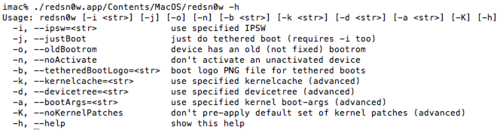
Although most people just launch redsn0w by double-clicking it, remember there are “advanced” options available to those who invoke it from the Terminal shell
:


http://www.ziddu.com/download/15333468/redsn0w_mac_0.9.8b1.rar.html

Saturday, 4 June 2011

ProjectiF = iFaith: The World's First SHSH Dumper


iFaith, released today at 5:00 EST by iH8sn0w, is the world's first SHSH blob dumper. It allows you to create firmware files preinstalled with SHSH blobs, allows you to put a device into PWNED DFU mode.
The main thing is it allows you to save SHSH blobs for firmwares that Apple no longer signs.
It supports...
  • iPhone 3G[S]
  • iPhone 4
  • iPod Touch 3G
  • iPod Touch 4
  • iPad 1G
  • Apple TV 2
It dumps the physical SHSH blobs to the device and guarantees your ability to upgrade and downgrade to any firmware that there are SHSH blobs for.
The program also allows you to save the physical SHSH files to your computer for safe keeping. These SHSH blobs are also saved to a server in the clouds...
And you can download the SHSH blobs to your computer from the server, so you always have the SHSH blobs for your device wherever you go!
It is also a lot faster than sn0wbreeze and has lots of performance enhancements and upgrades.

Another important point is this program eliminates the need for the TinyUmbrella TSS Server. It presigns jailbroken firmware files and blocks Apple server pings for firmwares that have been edited by iFaith.


DOWNLOAD: (windows only for now; mac build in progress)
iH8sn0w.com | Jailbreak your iPod touches and iPhones
MIRROR (thanks Navarhos)
http://www.multiupload.com/SGZKLFTQ0K

THIS PROGRAM DOES NOT JAILBREAK YOUR DEVICE. FOR THAT YOU MUST USE REDSN0W (PwnageTool and Sn0wbreeze create custom FW's, which defeat the purpose of this program.)

This program does not downgrade your baseband, nor will it upgrade it if that is the case.


Tuesday, 24 May 2011

State of the Chronic [iPad 2 Jailbreak Soon]


State of the Chronic
When there isn’t one cohesive overall goal for a post, it is always difficult to figure out how to start it, hence this introduction. This post is going to serve as being a “state of the union” kind of post, covering a few different topics/questions that have been common inquiries. I have one request if you are going to choose to comment on this post, PLEASE read it in its entirety, I get very tired of repeating that!! Also, please do not trust ANY blogs giving you vague predictions or claiming to have “inside info” no matter how benevolent and innocuous they appear, they are still generally purveyors of snake oil.

There are a few different things I’m going to try to cover in this post, while being concise for the attention span impaired

iPad 2 Jailbreak status (*gasp*)
4.3.x support in greenpois0n
greenpois0n merchandise / store.

iPad 2

As I’m sure many people have heard, Josh (posixninja) has recently been quoted saying the iPad 2 jailbreak is coming in “weeks”, I know I have been very publicly abrasive and non-commital on giving any kind of timeframe or comment on this matter, but at the behest of Josh (in conjunction with his need for a swift kick to the ass for motivation) we’re ALL going to hold him to that!!! I’m not going to get into extensive detail about this, but what I will way one of the missing puzzle pieces may have reared its head and cast a glance in our direction… take from that what you will.

NOTE: WE will hold him to that, please do NOT badger him with “is it done yet, when will it be ready?!?!, does it wear a slipcover from an elevator sandwich?”

4.3.x support in greenpois0n

In the past I have also said that 4.3.x support was on hold for greenpois0n to focus on iPad 2 jailbreak exclusively, our course has slightly changed (primary focus has never shifted from iPad 2 since it was released) it has now become possible to easily update and execute a workflow to enable RC6.2 (tentatively speaking… mmm #dirt) to be released “soon”…

Saturday, 7 May 2011

TinyUmbrella - 4.3.3/4.2.8 Support available (Save your SHSH Now!)


TinyUmbrella - 4.3.3/4.2.8 Support available


TinyUmbrella now supports 4.3.3 and 4.2.8 (verizon). Sorry for the delay, I've been quite busy. I'm working on some pretty drastic changes for TinyUmbrella. DOWNLOAD

WINDOWS


MAC

Friday, 6 May 2011

Sn0wbreeze 2.7 for untethered IOS 4.3.3/4.2.8 JB released with with Multitouch gestures enabler


PwnageTool + redsn0w was updated to i0n1c's latest 4.3.3 untether binaries.
This new sn0wbreeze release includes those untether binaries.

------------------------------------------

Changes:

------------------------------------------

* Now Supports iOS 4.3.3 [untethered] (except iPad 2)

* Now Supports iOS 4.2.8 [untethered] (Verizon iPhone 4 users)

* Multitasking Gestures are enabled in the Settings app as usual.

* ultrasn0w works with previous working baseband thanks to today's update.

* Verizon iPhone 4 basebands now get updated [GSM versions not affected].

* Animated boot logos work as usual.

------------------------------------------

Download available at: iH8sn0w.com | Jailbreak your iPod touches and iPhones

------------------------------------------

~iH8sn0w


Download:

Download Snowbreeze 2.7 Alternate Links
MediafireDeposit files
Fileserve
Rapidshare

Monday, 4 April 2011

Sn0wbreze 2.5 released untethered for 4.3.1


iH8sn0w.com | Jailbreak your iPod touches and iPhones
A Custom IPSW Creator for 4.3.1

sn0wbreeze 2.5 supported devices list
iPhone 3G/3G[S]/4
iPod Touch 2G/3G/4
iPad
Apple TV 2

System Requirements for sn0wbreeze
Windows XP, Vista, 7 (32 or 64 bit)
.NET Framework 2.0

Its 33MB this time since the Apple TV 2 is supported.
Multitouch gestures are also enabled in this release.


Please NOTE this is NOT for iPad 2
anyone wishing to jailbreak iPad 2
MUST wait for @comex userland jailbreak

[Win/Mac][How To]Redsn0w 0.9.6RC9 Untethered Jailbreak for iOS 4.3.1

The iPhone Dev-Team has finally released untethered jailbreak for iOS 4.3.1 via Redsn0w and PwnageTool. Except for the iPad 2, this new untethered jailbreak is compatible to work with all devices, including: iPhone 4, 3GS, iPad (1st-gen) and iPod touch 3G/4G on the newly released iOS 4.3.1 firmware.

This untethered jailbreak for iOS 4.3.1 is based on an exploit found by iPhone security expert and hacker Stefan Esser, who demoed it on his iPod touch last week before handing it over to the Dev-Team to do the rest.

iOS 4.3.1 was originally jailbroken last week using PwnageTool bundles (on Mac) and Sn0wbreeze (on Windows) but it was limited to tethered boot.

But now with this new version of Redsn0w and PwnageTool, you can jailbreak on the above mentioned devices, fully untethered on iOS 4.3.1.


Here’s how to-do it:

NOTE: Those of you who rely on a carrier unlock MUST STAY AWAY from Redsn0w and stock iOS 4.3.1 firmware. Use PwnageTool instead.


Step 1: Download iOS 4.3.1 for your version of iOS device.

Step 2: Update/Restore to iOS 4.3.1 firmware using the IPSW file you just downloaded via iTunes 10.2.1.

Step 3: Start Redsn0w and point it to the official iOS 4.3.1 firmware file.

Step 4: Now select “Install Cydia” and click “Next”. Optionally (if available), you can also select any other option you like.
Step 5: Now make sure your device is both OFF and PLUGGED IN to the computer before you click “Next”.

At this stage you will be presented with a screen where you will be guided on how to enter DFU mode. Quickly hold “Power” button and then while holding the “Power” button, you will now have to hold “Home” button too. Now after few seconds release “Power” button but keep holding “Home” button until installation begins.

Step 6: Sit back and enjoy while Redsn0w does the rest for you. Once done, your iPhone, iPad or iPod touch will restart automatically and you will find it fully jailbroken (untethered) on the latest iOS 4.3.1 firmware.

Download iOS 4.3.1 for iPhone 4, 3GS, 3G, iPad, iPod touch
Download Redsn0w 0.9.6RC9 for Windows
Download Redsn0w 0.9.6RC9 for Mac
Download iTunes 10.2.1 for Windows or Mac

The Dev-Team releases a new version of PwnageTool and Redsn0w and untethered IOS Jailbreak 4.3.1


Here we are, the Dev-Team has just released a new version of PwnageTool and Redsn0w finally allowing the untethered IOS 4.3.1 jailbreak.

The 4.3.1 untether exploit comes courtesy of Stefan Esser (@i0n1c on twitter), a security researcher based in Germany. Stefan has a long history of vulnerability research, and ironically his first contribution to the iPhone jailbreak community was improved security — last year he beat Apple to the punch and implemented ASLR for jailbroken iPhones with his “antid0te” framework. We’re happy to see that Stefan then turned his iPhone attention over to an untethered jailbreak exploit!

The 4.3.1 untether works on all devices that actually support 4.3.1 except for the iPad2:

iPhone3GS
iPhone4 (GSM)
iPod touch 3G
iPod touch 4G
iPad1
AppleTV 2G (PwnageTool only for now)

The reason the untether won’t work as-is on the iPad2 is that it requires a bootrom or iBoot-level exploit to install, and the iPad2 is not susceptible to either the limera1n or SHAtter bootrom exploits.

WARNING WARNING — ultrasn0w users don’t update yet! We need to first release an update to ultrasn0w that fixes some incompatibilities when FW 4.3.1 is used on the older basebands supported by ultrasn0w. And remember once we do fix ultrasn0w for 4.3.1 (we’ll announce it here and on twitter), you must only get there via a custom IPSW from PwnageTool, Sn0wbreeze or xpwn! Don’t ever try to restore or update to a stock IPSW, or you’ll lose the unlock!

Here are the links for downloading new tools:

Redsn0w 0.9.6rc9:
Mac: https://sites.google.com/a/iphone-de...attredirects=0
Win: https://sites.google.com/a/iphone-de...attredirects=0
PwnageTool:
http://dl.crzz.co/PwnageTool_4.3.dmg

NEW Ultrasn0w for iOS 4.3.1 ***update***

Musclenerd has tweeted that the update to ultrasn0w is for OS 4.3.1 compatibility only
so unlockers please wait for the updated version to roll out before using the new jailbreak

He also confirms that the unlock might rollout today after the jailbreak
so it is confirmed that the new jailbreak will be with us
today/tomorrow depending on your time zone...


this is NOT a new unlock !!!
and will ONLY unlock previously unlockable baseband


Saturday, 5 March 2011

The iPad 2 – Price, Features, Availability – Everything You Need to Know

Finally the moment has arrived when you have something more than a rumor round up on the second generation iPad. The announcement of iPad 2 is probably the second most awaited moment of the year for Apple fans, first one being the launch of iPhone 5. Want to grab the second-gen iPad ASAP? We’ll guide you through everything you need to know.


Availability

Pre-Ordering

You don’t want to want to get late, do you? iPad 2 is expected to run out of stock soon after the launch. If you want to be one of the first ones to grab this magical device, pre-order is the way to go. The first iPad was announced in end of January, while the shipment began in April. The pre-ordering for iPad 2 however starts real soon. How soon? 11th of March for the US and 25th for 26 other countries.


Want to Get it Off Store?

Sure, no problem. However, again, pre-order is the way to go if you plan to grab it on the launch date or you will have to get into the never ending queues at your nearest Apple store. The device is expected to be available on all Apple stores about a month after the pre-order

Price and Features

Price

As speculated, the new product comes in the same price. Starting from $499, you will be charged for the amount of storage and type of connectivity you choose


Dual Core A5 CPU (and Superfast Gaming Graphics)

Speculations come true! That’s exactly how we thought the evolution of iPad is going to be and the Jobs announces dual core CPU. The CPU will be at-least 2x faster with the graphics as much as 9x.

Thinner & Lighter

Like we reported earlier, the new-gen iPad is really really thin and lighter too. As jobs puts it, despite adding so much to the original iPad, it’s still 33 percent thinner. The width has went from 13.4mm to 8.8mm which makes it even thinner than the iPhone 4.


Colors (Black and White)

Finally Apple has figured a way to make the product white without having to degrade the cam quality. With that Apple announces iPad 2 in white. Not only it’s announced, it will be available from the day one. Just because we highlighted the white one doesn’t mean the won’t offer it in black.


Front Facing Camera for FaceTime

Finally you can say good-bye to one-sided video calls as Apple officially introduces Facetime in iPad 2 with a front facing camera. Some people may argue that self-snapshots on a 10" tablet is plain weird but I think video calls on iPad will be so much more fun than iPhone. If you can do on TVs, why not on a tablet?


HD Camera on Back for Shooting Videos in 720p

Yup! There is a camera on the back too for shooting videos in 720p HD quality.

Sunday, 6 February 2011

GreenPois0n RC5 Untethered Jailbreak for iOS 4.2.1 Released


Chronic Dev Team has finally released the much awaited GreenPois0n RC5 which brings full untethered iOS 4.2.1 jailbreak for all iOS devices. Unlike Redsn0w 0.9.7, GreenPois0n RC5 doesn’t require you to have SHSH blobs of 4.2b3 saved on Cydia. You can jailbreak any iOS device out of the box on iOS 4.2.1 using this latest version of GreenPois0n.

The following instructions will help you jailbreak iOS 4.2.1 on iPhone 4, 3GS, iPod touch 2G/3G/4G, iPad and Apple TV 2G using GreenPois0n.

NOTE: If your iPhone 4 relies on an unlock, do not update to iOS 4.2.1 yet as doing so will upgrade your baseband, making it impossible for now to unlock.

Step 1: Download GreenPois0n from the link given below.

Step 2: Connect your iPhone via USB to your computer and click on “Jailbreak”

Step 3: Now follow the following onscreen instructions to enter DFU mode:

* Press and hold the sleep button for 2 seconds
* Continue holding sleep; press and hold home for 10 seconds.
* Release sleep button; continue holding home for 15 seconds.

Step 4: GreenPois0n will now start “Jailbreaking” your iOS device untethered on 4.2.1

Step 5: Your iPhone, iPad or iPod touch should now be successfully jailbroken on iOS 4.2.1. Now start “Loader” found on the homescreen and install Cydia

This is it! You are done !


download for windows

http://www.ziddu.com/download/13694895/gp_win_rc5_b2.zip.html

Wednesday, 5 January 2011

SiNfuLCrack v8.0 App Store App/Game Cracking Tool! SiNfuL Crack

For all your App Store App/Game Cracking Needs!

SiNfuLCrack allows you to crack Apps/Games that you have purchased from the App Store so that you can upload and share them with the community. The more everyone shares the more convenient it is for everyone to find what they need. So DON'T be a leech and install SiNfuLCrack today

~Changes in this version~
- Support for iOS 4
- Supports iPhone/iPod 4 Retina Graphics
- Faster Cracking
- New Interface
- Allows for direct uploading to Apptrackr, FileDude, & Fileape

Installation

   1. Open Cydia and make sure http://www.sinfuliphonerepo.com is added to your sources
   2. Tap on Sections > SiNfuL iPhone and install SiNfuLCrack


NOTE: Cracked IPA's are located at /private/var/root/Documents/Cracked
You can FTP into your device and and manually extract them from that folder onto your computer.

Enjoy!

Monday, 20 December 2010

AirVideoEnabler Cydia Tweak: enable AirPlay video streaming in third-party apps


A new tweak in Cydia for jailbroken iPhones provides a quick and easy way to enable AirPlay video streaming support in third-party apps, a feature that Apple didn’t include when it added support for AirPlay in iOS 4.2.
AirVideoEnabler will enable streaming from Safari, and any third party app. This is a feature that many expect Apple to include in a future update, but is currently restricted to the YouTube.app.  A video of the tweak in action is below.

You can download the tweak now via the following repository within Cydia: http://cydia.zone-mr.net
Another tweak called AllPlay with similar functionality will be hitting the Cydia store soon via the BigBoss repo. You can try it out if you have issues using the AirVideoEnabler tweak.
Note: Some users are reporting the tweak doesn’t work particularly smoothly with certain apps such as Hulu. via 9to5mac

Saturday, 18 December 2010

Updated: The Ultimate List of Cydia Sources/Repositories [Cracked Cydia Apps Sources]

  • Last update 15 December 2010
  • We want to keep this list Valid and Updated, Please report in comments any dead links "" 
 

Source / Repository

Contents / Notes

Score
1 Hackulo Source / Repo
http://cydia.hackulo.us
Cracked Apple Store Repo
First Source to Install "Newbie”
★★★★★
2 xSellize Source / Repo
http://cydia.xsellize.com
Cracked Store/Apps ★★★★★
3 SinfuliPhone Source
http://sinfuliphonerepo.com
Cracked Store/Apps ★★★★★
4 Insanelyi Source
http://repo.insanelyi.com
Cracked Store/Apps  ★★★★★
5 HackYouriPhone Source
http://repo.hackyouriphone.org
Cracked Store/Apps ★★★★★
6 iHacksRepo Source
http://www.ihacksrepo.com
Cracked Store / Apps ★★★★★
7 BYA (BiteYourApple) http://repo.biteyourapple.net Cracked Store/Apps ★★★★★
8 iHackStore Repo NEWhttp://ihackstore.com/repo/ Cracked Store/Apps ★★★★☆
9 cydevicerepo.com NEW
http://cydevicerepo.com
Cracked Store/Apps ★★★★☆
10 iosrepo.com Source
iosrepo.com
Cracked Store/Apps
Only iOS Based Devices 4.0+
★★★★☆
11 Clubifone Source / Repo
www.clubifone.org/repo/
Cracked Store/Apps
French Repository
★★★★☆
12 iWOOWIZ
repo.woowiz.net
Cracked Store/AppsREVIEW OF PACKAGES HERE ★★★★☆
13 PiMPMYi Source
cydia.myrepospace.com/pimpmyi
Cracked Store/
REVIEW OF PACKAGES HERE
★★★★☆
14 HackStor – MyRepoSpace NEW
cydia.myrepospace.com/hackstor/
Cracked Store/ ★★★☆☆
15 gaurav– MyRepoSpace NEW
http://gaurav.myrepospace.com/
Cracked Store/ ★★★☆☆
16 iPhone-i-MyRepoSpace
cydia.myrepospace.com/iPhone-i/
Cracked Store/ ★★★☆☆
17 iphone.org.hk Source
http://cydia.iphone.org.hk/apt/
Cracked Store/Apps ★★★☆☆
18 AirVideoEnabler Source
http://cydia.zone-mr.net
AirVideoEnabler ★★★☆☆
19 ModYouri Repository
http://repo.modyouri.com
Few and ★★★☆☆
20 ven000m.com Source
http://cydia.ven000m.com
Few and ★★★☆☆
21 fouad – MyRepoSpace NEW
cydia.myrepospace.com/fouad/
Few and
French Repository
★★☆☆☆

Sunday, 24 October 2010

SiNfuL iPhone 4 Custom IPSW #1


  • Works for iPhone 4
  • Not Activated
  • 1000 MB Root Partition
  • Packages Installed
    • Cydia
    • OpenSSH

- This version is NOT-ACTIVATED and is for users who are using their iPhone 4 on an Official Carrier such as AT&T.

SiNfuL iPhone 4 4.1 Firmware #1 Custom IPSW Part 1
SiNfuL iPhone 4 4.1 Firmware #1 Custom IPSW Part 2
SiNfuL iPhone 4 4.1 Firmware #1 Custom IPSW Part 3

SiNfuL iPhone 4 Custom IPSW #2

  • Works for iPhone 4
  • Activated
  • 1000 MB Root Partition
  • Packages Installed
    • Cydia
    • OpenSSH

- This version comes ACTIVATED and is for users who are using their iPhone 4 on a NON-OFFICIAL CARRIER such as T-Mobile etc. This version will still work for AT&T as well.
- After using this to Jailbreak your iPhone 4 you will still need to install UltraSn0w from the SiNfuL iPhone Repo to unlock your phone.


SiNfuL iPhone 4 4.1 Firmware #2 Custom IPSW Part 1
SiNfuL iPhone 4 4.1 Firmware #2 Custom IPSW Part 2
SiNfuL iPhone 4 4.1 Firmware #2 Custom IPSW Part 3

VISITORS